

The landscape of low-code development platforms has been rapidly evolving, and Structr has consistently remained at the forefront of innovation in graph-based application development. Today, we want to explore one of the most significant architectural advances in Structr’s evolution: the integration of GraalVM’s polyglot engine, which was first introduced with Structr 4.0 and transforms how developers interact with Structr’s powerful graph database integration capabilities.
With the launch of the upcoming Structr Version 6.0, we want to spotlight this robust integration and demonstrate its powerful capabilities alongside several significant enhancements. Key improvements include an upgrade to GraalVM 25 and comprehensive ECMA-Script module support, enabling developers to, for example, build and organize JavaScript libraries within Structr’s integrated filesystem, incorporate existing codebases, and utilize standard ES6 import statements seamlessly throughout the polyglot environment. This filesystem-based module approach extends beyond JavaScript to other supported GraalVM languages as well.
These advancements enable developers to better organize and reuse code across Structr projects, creating modular libraries that can be shared between different applications and components within the platform while maintaining the rapid development benefits that make low-code development so effective.

From Legacy JavaScript Engines to Modern Polyglot Runtime
For years, Structr relied on JavaScript engines like Nashorn and Rhino to power its scripting capabilities. While these engines served the platform well in its early days, they eventually became limiting factors as they reached deprecated status, offered outdated JavaScript support, and suffered from performance constraints that hindered modern development workflows.
The integration of GraalVM’s polyglot engine represents a fundamental shift from single-language scripting to a truly modern, multi-language development environment. Where developers once were constrained by the limitations of legacy JavaScript engines, they can now choose from multiple programming languages—JavaScript with modern ES6+ support, Python, and many others—all within a unified runtime environment that maintains seamless interoperability.
Structr's Built-in Function Library: 200+ Functions at Your Fingertips
At the heart of this integration lies Structr’s comprehensive library of over 200 built-in functions, accessible through the familiar $ or Structr objects. These functions span everything from complex Neo4j Cypher queries and HTTP API integrations to PDF generation and MongoDB operations. With GraalVM’s polyglot engine, this entire function ecosystem becomes available across multiple programming languages, creating unprecedented flexibility in how developers approach application logic.
The function categories include:
- Database Operations: Direct Neo4j integration with
$.cypher()and advanced search with$.find() - External API Integration: HTTP functions for seamless service communication
- Document Generation: File creation (PDF, CSV, Excel, XML etc.) and file manipulation capabilities
- Database Connectivity: Neo4j, MongoDB, JDBC integration and external database access
- Transaction Management: Advanced transaction handling with
$.doInNewTransaction()or$.schedule()
{
       // Simple example: Finding users with predicates
       $.find('User', $.predicate.equals('isAdmin', true));
}
For a complete reference of all available functions, see the Structr Built-in Functions Documentation.
For comprehensive examples of all function categories, see the Detailed Function Examples section below.
Graph Navigation: From Complex Queries to Intuitive Object Access
One of the most powerful aspects of Structr’s GraalVM integration is how it transforms complex Neo4j graph relationships into intuitive object navigation. Instead of writing complex Cypher queries for every relationship traversal, developers can navigate the graph using simple property access patterns that feel natural in any programming language.
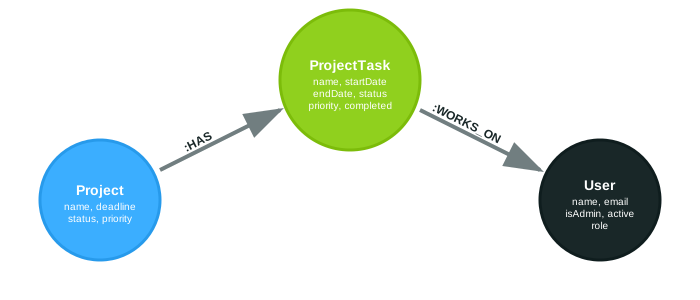
Consider a typical project management data model with Projects, ProjectTasks, and Users. With traditional approaches, you’d write complex Cypher queries. With Structr’s graph navigation, relationships become as simple as accessing object properties:
{
	// Navigate graph relationships intuitively
	let user = $.me; // me as the keyword for the authenticated user
	let userTasks = user.tasks; // Automatic relationship traversal
	userTasks.map(task => task.project);
}
This approach allows developers to combine the best of both worlds—using Cypher for complex pattern matching and filtering, then leveraging JavaScript for data processing and business logic. See Advanced Graph Navigation Examples for multi-hop traversal and complex patterns.
Schema Methods: Embedding Polyglot Logic in Data Types
GraalVM’s polyglot engine extends beyond scripting into Structr’s schema definition itself. Developers can define custom methods directly on data types, creating reusable business logic that travels with the data model. These methods can be written in any supported polyglot language and have access to the full Structr function library.
Schema methods come in three distinct types, each serving different purposes within Structr’s data model:
- Lifecycle Methods: Automatically triggered by Structr during node lifecycle events such as
onCreate,onSave,onDelete, and others. These methods are called on node instances with access to$.thiswhen the corresponding event occurs, enabling automatic data validation, relationship management, or side effects. - Instance Methods: Explicitly called on specific node instances with access to the current node context through
$.this. These methods encapsulate business logic that operates on individual nodes and can utilize the full power of Structr’s built-in functions. - Static Methods: Called directly on data types without requiring a specific node instance. These utility methods are ideal for type-level operations such as finding nodes with specific criteria or performing aggregate operations across all instances of a type.
// Simple schema method example
{ // Instance method on Project type
  $.this.tasks.push($.create("ProjectTask", {name: "New Task"}));
}
This enables developers to encapsulate business logic directly in their data model, making applications more maintainable and logic more reusable. For comprehensive schema method examples including Python implementations, see Schema Method Examples.
Frontend Integration: Polyglot Power in Templates
The same polyglot capabilities extend seamlessly throughout Structr’s entire stack, including frontend template rendering. Developers can use graph navigation and built-in functions directly in templates, creating dynamic, data-driven interfaces.
<div class="user-dashboard">
  <h2>My Projects</h2>
  <div class="projects-container">
    ${{
      let userProjects = $.mergeUnique($.me.tasks.map(task => task.project));
      $.include("project-list-template", userProjects, "project");
    }}
  </div>
</div>
This demonstrates the global integration of GraalVM’s polyglot engine—whether you’re in backend logic, frontend rendering, or schema methods, the same navigation patterns and functions work consistently across all contexts.
Multi-Language Support: Beyond JavaScript
While JavaScript remains the primary scripting language in Structr, GraalVM’s polyglot engine opens doors to additional programming languages for specialized use cases. Python brings powerful data processing capabilities and other languages can be integrated as needed.
python{
def getUserNames():
	users = list(map(lambda u: u.name, Structr.find("User")))
	return users

getUserNames()
}
The beauty of this approach is that regardless of the language chosen, developers maintain access to Structr’s comprehensive built-in function library through consistent APIs like Structr.call() for Python contexts.
Conclusion: A New Era of Low-Code Development
GraalVM’s integration with Structr represents more than just a technical upgrade—it’s a paradigm shift that brings modern, polyglot capabilities to graph-based low-code development. By combining the intuitive power of object navigation, the flexibility of multiple programming languages, and the comprehensive functionality of Structr’s built-in library, developers can build sophisticated applications with unprecedented ease and flexibility.
This transformation ensures that Structr remains at the cutting edge of low-code platforms, providing developers with the tools they need to tackle complex challenges while maintaining the rapid development capabilities that make low-code platforms so powerful.
Detailed Function Examples
Database Operations with JavaScript
One of Structr’s most powerful features is its direct integration with Neo4j through built-in functions like $.cypher() and $.find(). These database operations provide intuitive access to complex graph queries and data manipulation.
Complex User Query
{
	// Find admin users with advanced predicates
	// In this example only find Users with names "jeff" or "joe"
	let adminUsers = $.find('User', $.predicate.and(
	    $.predicate.equals('isAdmin', true),
	    $.predicate.or([
	        $.predicate.equals('name', 'jeff'),
	        $.predicate.equals('name', 'joe')
	    ])
	));

	// Execute raw Cypher with parameters
	let query = "MATCH (user:User) WHERE user.name = $userName RETURN user";
	let users = $.cypher(query, {userName: 'admin'});
}
Advanced Transaction Management
Structr’s $.doInNewTransaction() function demonstrates how complex database operations can be managed with proper transaction boundaries:
Batch Processing
{
	let pageSize = 10;
	let pageNo = 1;

	$.doInNewTransaction(function() {
	    let nodes = $.find('User', $.predicate.page(pageNo, pageSize));

	    nodes.forEach(user => {
	        $.set(user, {lastProcessed: new Date()});
	    });

	    pageNo++;
	    return (nodes.length > 0);
	}, function(error) {
	    $.log('Error occurred:', error.getMessage());
	    return false;
	});
}
External API Integration
Structr’s HTTP functions showcase how external service integration works seamlessly.
RESTful API Calls
{
	// Configure headers and make requests
	$.addHeader('Authorization', 'Bearer ' + token);
	$.addHeader('Content-Type', 'application/json');

	// Simple GET request example
	let response = $.GET('https://api.example.com/users');

	// POST request example
	let postData = JSON.stringify({
	    name: 'New User',
	    email: 'user@example.com'
	});

	let createResponse = $.POST('https://api.example.com/users', postData);

	if (createResponse.status === 201) {
	    let newUser = createResponse.body;
	    $.log('Created user:', newUser.id);
	}
}
MongoDB Integration
The $.mongodb() function demonstrates how external database connections work seamlessly.
MongoDB Operations
{
	let collection = $.mongodb('mongodb://localhost', 'testDatabase', 'testCollection');

	// Insert with BSON helper
	collection.insertOne($.bson({
	    name: 'Test User',
	    email: 'test@example.com',
	    created: new Date()
	}));

	// Complex queries
	let activeAdmins = collection.find($.bson({
	    $and: [
	        { active: true },
	        { role: 'admin' },
	        { lastLogin: { $gte: new Date(2023, 0, 1) } }
	    ]
	}));
}
Document Generation and File Operations
Structr’s document generation capabilities, like PDF creation, provide powerful content creation tools.
PDF Generation
{
	$.setResponseHeader('Content-Disposition', 'attachment; filename="report.pdf"');
	$.setResponseHeader('Cache-Control', 'no-cache');

	let mainPage = 'pdf-export-main-page/';
	let header = '--header-html ' + $.get('base_url') + '/pdf-export-header-page/';
	let footer = '--footer-html ' + $.get('base_url') + '/pdf-export-footer-page/';
	let wkhtmlArgs = header + ' ' + footer + ' --disable-smart-shrinking';

	// transform html pages to a pdf
	let pdf = $.pdf(mainPage, wkhtmlArgs);

	// save the pdf content in a new file
	let newPDFFile = $.create("File", {
		name: 'new-file.pdf'
	})
	$.setContent(newPDFFile, pdf, "ISO-8859-1");
}
Advanced Graph Navigation Examples
JavaScript Graph Navigation
With Structr’s polyglot engine, navigating relationships becomes as simple as accessing object properties:
{
	// Get the current authenticated user
	let user = $.me;

	// Navigate directly to all tasks assigned to this user
	// This automatically traverses the WORKS_ON relationship
	let allUserTasks = user.tasks;

	// From tasks, navigate to their parent projects
	// Using reduce to collect unique projects from all tasks
	let allProjectsOfUser = $.mergeUnique(user.tasks.map(task => task.project));

	// Get task counts per project for the current user
	let projectTaskCounts = allProjectsOfUser.map(project => ({
	    project: project,
	    taskCount: project.tasks.filter(task => user.tasks.includes(task)).length,
	    completedTasks: project.tasks.filter(task =>
	        user.tasks.includes(task) && task.completed
	    ).length
	}));

	// Find projects where user is the primary contributor
	let primaryProjects = allProjectsOfUser.filter(project => {
	    let projectTasks = project.tasks;
	    let userTasksInProject = projectTasks.filter(task => user.tasks.includes(task));
	    return userTasksInProject.length > projectTasks.length * 0.5; // >50% of tasks
	});
}
Multi-Hop Navigation
{
	// Navigate through multiple relationship levels
	let user = $.me;

	// Get all team members working on the same projects
	let userProjects = user.tasks.map(task => task.project);
	let colleagues = [];

	for (let project of userProjects) {
	    let projectUsers = project.tasks
	        .flatMap(task => task.users)
	        .filter(colleague => colleague.id !== user.id);

	    // Add unique colleagues
	    for (let colleague of projectUsers) {
	        if (!colleagues.find(c => c.id === colleague.id)) {
	            colleagues.push(colleague);
	        }
	    }
	}

	// Find project dependencies through shared resources
	let projectDependencies = userProjects.map(project => {
	    let dependencies = [];

	    // Get all users working on this project
	    let projectUsers = project.tasks.reduce((users, task) => {
	        task.users.forEach(user => {
	            if (!users.find(u => u.id === user.id)) {
	                users.push(user);
	            }
	        });
	        return users;
	    }, []);

	    // Find other projects these users work on
	    for (let projectUser of projectUsers) {
	        let otherProjects = projectUser.tasks
	            .map(task => task.project)
	            .filter(p => p.id !== project.id);

	        for (let otherProject of otherProjects) {
	            if (!dependencies.find(p => p.id === otherProject.id)) {
	                dependencies.push(otherProject);
	            }
	        }
	    }

	    return {
	        project: project,
	        dependencies: dependencies
	    };
	});
}
Mixing Graph Navigation with Cypher
{
	let user = $.me;

	// Use graph navigation for simple relationship traversal
	let projectTimeline = user.tasks.map(task => ({
	    project: task.project.name,
	    task: task.name,
	    startDate: task.startDate,
	    endDate: task.endDate,
	    status: task.status,
	    teamSize: task.users.length
	}));

	// Sort by start date
	projectTimeline.sort((a, b) => a.startDate - b.startDate);

	// Use Cypher for complex filtering and pattern matching
	let qualityQuery = `
	    MATCH (u:User {id: $userId})-[:WORKS_ON]->(task:ProjectTask)<-[:HAS]-(project:Project)
	    WHERE project.status = 'active'
	      AND task.priority IN ['high', 'critical']
	      AND task.dueDate > timestamp()
	    RETURN DISTINCT project
	`;

	let activeHighPriorityProjects = $.cypher(qualityQuery, {userId: user.id});

	// Now use Structr's JavaScript functions for quality analysis
	let qualityAnalysis = activeHighPriorityProjects.map(project => {
	    // Get all tasks in this project using graph navigation
	    let allProjectTasks = project.tasks;
	    let userTasks = user.tasks.filter(task => task.project.id === project.id);

	    // Calculate quality metrics using JavaScript
	    let overdueTasks = allProjectTasks.filter(task =>
	        task.dueDate && task.dueDate < Date.now() && task.status !== 'completed'
	    ).length;

	    let completionRate = allProjectTasks.length > 0
	        ? (allProjectTasks.filter(task => task.status === 'completed').length / allProjectTasks.length * 100).toFixed(1)
	        : 0;

	    // Find critical path tasks using graph navigation
	    let criticalTasks = allProjectTasks.filter(task =>
	        task.priority === 'critical' && task.status !== 'completed'
	    );

	    // Calculate team velocity
	    let recentlyCompleted = allProjectTasks.filter(task =>
	        task.status === 'completed' &&
	        task.completedDate &&
	        task.completedDate > Date.now() - (7 * 24 * 60 * 60 * 1000) // Last 7 days
	    ).length;

	    return {
	        projectName: project.name,
	        projectDeadline: project.deadline,
	        totalTasks: allProjectTasks.length,
	        userTasks: userTasks.length,
	        overdueTasks: overdueTasks,
	        completionRate: completionRate,
	        criticalTasksRemaining: criticalTasks.length,
	        weeklyVelocity: recentlyCompleted,
	        riskLevel: overdueTasks > 3 || criticalTasks.length > 1 ? 'high' : 'low'
	    };
	});
}
Schema Method Examples
Instance Methods on Data Types
Schema methods can be defined on any data type and called directly on node instances retrieved through functions like $.cypher() or $.find(). These methods have access to the current node context through $.this and can utilize the full power of Structr’s built-in functions.
Example – Project Type with addNewTask Method
// Method defined on Project schema type
{
    // Adds a new ProjectTask and connects it with the project node
    $.this.tasks.push($.create("ProjectTask", {
        name: $.methodsParameters.name ?? "New Task",
        dueDate: new Date(2026, 01, 01)
    }));
}
{
	// Find a project and call the custom method
	let project = $.find('Project', {name: 'Website Redesign'})[0];
	project.addNewTask({name: `New Task for ${project.name}`}); // Calls the schema method

	// Or use with Cypher results
	let urgentProjects = $.cypher('MATCH (p:Project) WHERE p.priority = "urgent" RETURN p');
	urgentProjects.forEach(project => {
	    project.addNewTask({name: `New Task for ${project.id}`}); // Each project gets a new task
	});
}
Advanced Schema Method Examples
Project Type – Calculate Project Health
// Schema method: calculateHealth()
{
    let totalTasks = $.this.tasks.length;
    let completedTasks = $.this.tasks.filter(task => task.status === 'completed').length;
    let overdueTasks = $.this.tasks.filter(task =>
        task.dueDate && task.dueDate < Date.now() && task.status !== 'completed'
    ).length;

    let completionRate = totalTasks > 0 ? (completedTasks / totalTasks) : 0;
    let healthScore = Math.max(0, completionRate * 100 - (overdueTasks * 10));

    return {
        healthScore: healthScore.toFixed(1),
        status: healthScore > 80 ? 'excellent' : healthScore > 60 ? 'good' : 'needs attention',
        totalTasks: totalTasks,
        completedTasks: completedTasks,
        overdueTasks: overdueTasks
    };
}
User Type – Get User Workload
// Schema method: getWorkloadSummary()
{
    let activeTasks = $.this.tasks.filter(task => task.status !== 'completed');
    let projectMap = {};

    activeTasks.forEach(task => {
        let projectName = task.project.name;
        if (!projectMap[projectName]) {
            projectMap[projectName] = {
                project: task.project,
                taskCount: 0,
                highPriorityCount: 0
            };
        }
        projectMap[projectName].taskCount++;
        if (task.priority === 'high' || task.priority === 'critical') {
            projectMap[projectName].highPriorityCount++;
        }
    });

    return {
        totalActiveTasks: activeTasks.length,
        projectCount: Object.keys(projectMap).length,
        projectBreakdown: Object.values(projectMap)
    };
}
Static Methods on Data Types
Project Type – Static Method to Find Overdue Projects
// Static schema method: Project.findOverdueProjects()
{
    let currentDate = Date.now();
    return $.find('Project', {
        deadline: $.predicate.lt(currentDate),
        status: $.predicate.not('completed')
    });
}
{
	// Call static method directly on the type
	let overdueProjects = $.Project.findOverdueProjects();

	// Process results with additional logic
	overdueProjects.forEach(project => {
	    let health = project.calculateHealth(); // Instance method
	    if (health.healthScore < 50) {
	        // Send notification or take action
	        $.log(`Project ${project.name} needs immediate attention`);
	    }
	});
}


